Before you can finish creating your target symbol, you'll need a little
background regarding the use of sound in Flash.
While you can do some great things by adding sound to Flash movies, Flash
does have its limitations. First of all, Macromedia isn't exactly crystal clear
on the subject of importing sounds. If you're using Flash 3 on a Macintosh, you
need to import an AIFF format sound file; if you're using Windows, it'll
have to be a WAVE format file. Keep in mind: Flash has no sound editor,
so if you want to alter or create a sound file and convert it to the proper
format, you have to use another application.
For this exercise, find yourself a nice, long sound clip. If you're
really in a bind, you can always select something from the sound library
(Libraries:Sound) that comes with Flash.
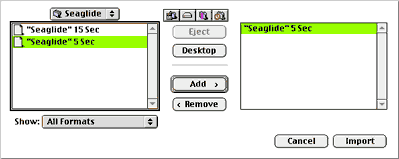
To import a sound file (again, it's AIFF for Mac, WAVE for Windows),
select File:Import, locate the file, click the Add and Import buttons (on a
Macintosh, you can instead just drag the icon of the file into the
movie window to import it). Double-click on the first and only keyframe in the time line to
get the Frame Properties dialog boxes. On the Sound panel, you'll find a
pulldown menu at the top. The sound you just imported should be available
there (if not, try importing it again, and make sure you've selected a file
of the proper format).
If your sound file is lengthy, you can leave it as it is. If it's short,
you can lengthen it by entering a number in the Loops field to indicate the
number of times you want the sound to repeat when it plays. Actually, the
loop tool provides an easy way to lengthen the duration of your sound without
adding to the file size of your Shockwave movie. If you want, you can set
the Loop number very high to play the sound virtually indefinitely.
Now let's set our properties.
next page»