You should still have the Sound panel of the Frame Properties open. Ifyou don't, double-click on the first and only keyframe of the Soundtracksymbol, and select the Sound tab. Although Flash is not a bona fide sound editor, you can still alter theway Flash plays a sound. At the left side of the sound dialog box,there are two graphs that represent the wave of the sound for the left andright channels. There is a small white box with a horizontal rule connectedto it. You can drag the white box to modify the output level (volume) ofthe sound. And you can click on the horizontal rule to add more white boxesand do all kinds of tweaking to the sound levels. Under the Effect menu onthe right, there are several built-in level adjustments.
But beware: If you want the left channel to be different from the right, youmust export your final Shockwave file with stereo sound, which effectivelydoubles the size of the sound information in your file. That's prettysignificant, since sound often adds the heaviest load to a Flash animation.
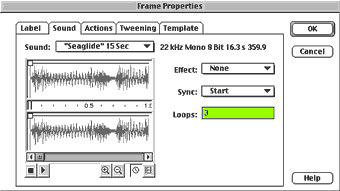
The Sync menu controls the way the sound is triggered in the movie.There are four choices:
Event (this is the default): When the sound is called, it just playsthrough.
Start: This is the same as Event, but it will allow only one instance of aparticular sound to play at a time. So if the sound were called from an earlierframe and is still playing, the sound will not start again. The Event mode,on the other hand, allows you to layer multiple instances of the same sound.
Stop: This will stop the playing of a specified sound.
Stream: Stream is used for synching the sound with the animation of themovie. It will force any animation in the movie to keep pace with the soundby skipping frames, if necessary. Also, a Stream sound will stop and startaccording to the time line of the movie, just like a graphic object does.
For this keyframe, set the Sync to Stop. This way the music can bestopped whenever the user wants. Also assign a stop action to thatframe so that the symbol will stick on the frame when it's called. Now youcan click the OK button.
Next, make a frame that will play the music. Insert a keyframe at thesecond frame in the time line. In the Frame Properties menus, assign thesame exact sound that you applied to the other frame, except this timechoose Start under the Sync menu. If you want it to play longer, enter anumber in the Loops field. You should also add a stop action to thiskeyframe (just like you did with the first keyframe).
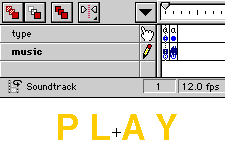
There's no rule that a symbol in Flash must contain a graphic element,but we'll add one in this case. Add a second layer to the symbol and dropin the word "Play" in your favorite type style. Insert a second keyframe.Select the type you just created and change it to "Stop" for just this (thesecond) keyframe. While the sound is playing, the Stop button will bevisible to the user; and vice versa.
Next, let's create the second symbol: the button.
next page»